
WebBrain works inside your logged-in browser. Treat that access with care.
The agent can see and use the same websites you can. Modes, plan review, and per-site permissions reduce risk, but you remain responsible for the prompt, destination, and outcome.
Modes set the kind of work
Use Ask whenever the result can be produced by reading. Switch to Act only when the requested outcome requires changing a page. Use Dev for web development and troubleshooting—not as a way to make a weak model smarter.
Permission prompts are capability-specific
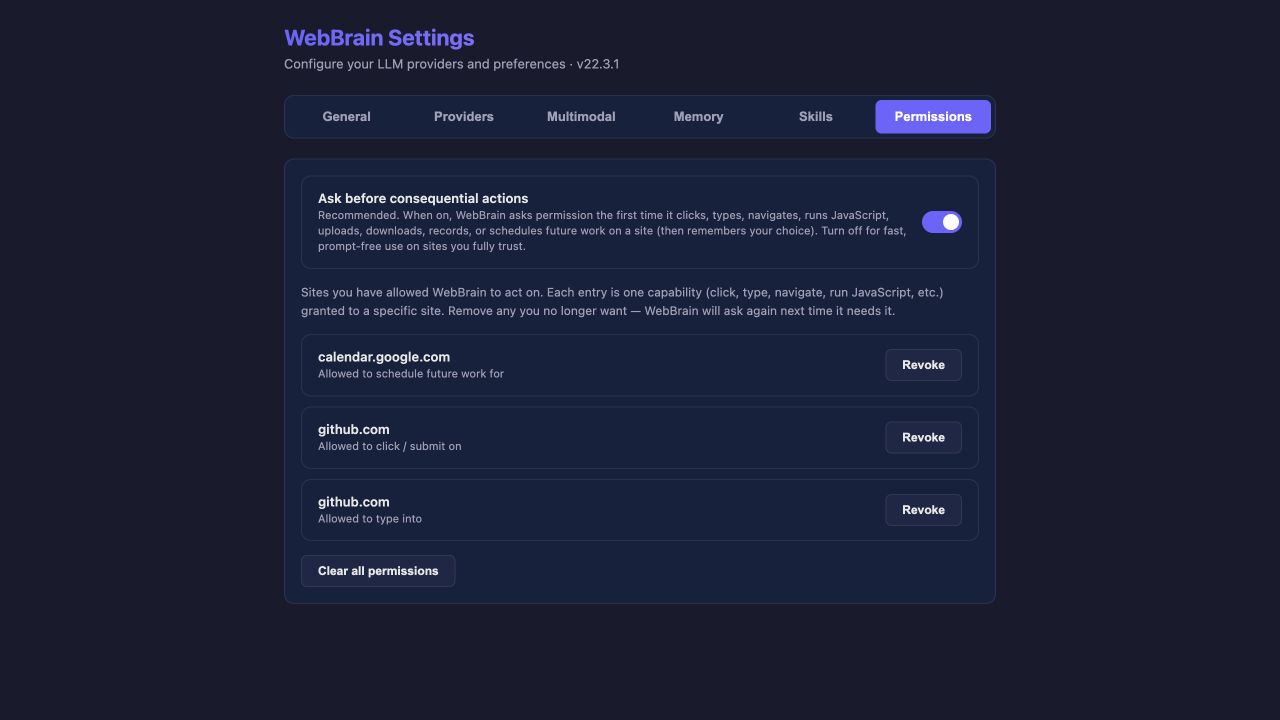
Before a consequential action on a site, WebBrain can ask whether to allow it once, always allow that capability on that host, or deny it. The remembered record is a pair: site + capability.
| Choice | Use it when | What happens later |
|---|---|---|
| Allow once | The action is reasonable but you do not want a standing grant. | WebBrain asks again the next time it needs that capability. |
| Always allow on host | You trust that site and expect the same action type repeatedly. | The matching site + capability record appears in Settings. |
| Don’t allow | The action, destination, or timing is wrong. | The action is blocked. You stay in control of the run. |
Pages are untrusted—even familiar pages
A page can contain text written to manipulate an AI agent. WebBrain wraps page-derived content as untrusted data and limits the action surface with modes and permissions. Those defenses reduce risk; they do not make every model or page safe.
- Stop if the agent follows instructions you did not give.
- Be cautious on health, finance, dating, private account, and internal work pages.
- Review destinations and form values before a submission.
- Avoid unattended Act-mode work on pages whose content can be edited by strangers.
The configured provider receives the conversation and the page-derived content WebBrain sends for the task. Use a provider whose privacy terms and operation you accept.
Two overrides that are easy to confuse
| Override | Scope | What it changes |
|---|---|---|
/allow-api | Current conversation | Allows write-method network egress—POST, PUT, PATCH, DELETE—when the agent judges an API path more reliable. It clears on reset and does not waive every other permission. |
/dangerously-skip-permissions | Global until re-enabled | Turns off “Ask before consequential actions” for all sites and capabilities. |
If one site and one action are trusted, grant that capability in the normal prompt. Do not disable the global permission gate just to avoid one confirmation.
What stays in the browser—and what may leave it
| Data | Stored where | Sent when |
|---|---|---|
| Conversation history | Browser local storage / IndexedDB | Relevant conversation context is sent to the active LLM provider during a turn. |
| Provider settings & API keys | Browser local storage, plaintext | Keys are sent to their provider to authenticate requests. |
| Profile auto-fill | Browser local storage, plaintext | Sent to the active provider as system-prompt context when enabled. |
| User memory | Browser local storage, plaintext | Active records are sent to the active provider as system-prompt context. |
| Traces & screenshots | Local IndexedDB when tracing is enabled | Not uploaded by the trace recorder. Export creates a local file. |
| Encrypted cloud sync | Opaque encrypted cloud copy plus local data | Supported keys, profile, and memory are encrypted before upload. The sync password is never sent or stored. |
WebBrain itself does not add general telemetry for agent conversations. A provider still sees the data included in its model request, and any site you act on sees the browser actions and submissions performed there.
Scheduled tasks deserve stricter defaults
A scheduled task can run when you are not watching. Keep Confirm scheduled consequential actions on so the run pauses before actions that need permission. If a task depends on changing page state, make the target URL, timing, expected result, and stop conditions explicit.
“At 9:00, open this dashboard, read the new status, and summarize it. Do not submit, acknowledge, or edit anything.” The boundary is as important as the task.
Before an important Act run
- Confirm the active provider and model.
- Use a fresh conversation for a clearly scoped task.
- Keep plan review and the permission gate on.
- Name actions the agent must not take.
- Stay available for permission and clarification prompts.
- Stop on unexpected navigation, credential handling, or repetition.
- Verify the real-world result; do not rely only on the final summary.