WebBrain now has an Ollama launch handoff
We have a first working WebBrain handoff for Ollama launch. From a local Ollama build, you can run one command, pick a model, approve a WebBrain browser prompt, and WebBrain will switch its local provider to that Ollama model. This is not integrated into upstream Ollama yet. For now, you can install it from the codex/ollama-webbrain-launch-handoff branch of esokullu/ollama. We hope Ollama will integrate it upstream.
What the handoff does
WebBrain already supports Ollama as a local OpenAI-compatible provider. The new handoff removes the settings-page friction around that setup.
Instead of opening WebBrain settings, typing a local base URL, picking a model, and checking the context window by hand, Ollama can open a WebBrain launch URL with the right values already attached:
- the selected Ollama model
- the local OpenAI-compatible base URL, such as
http://127.0.0.1:11434/v1 - the detected context window
- a source marker so WebBrain knows this came from Ollama
WebBrain then asks for one browser confirmation before updating the local Ollama provider and making it active.
Try it from the branch
The integration is not part of official upstream Ollama builds at the time of this post. To try it now, build from the branch:
git clone https://github.com/esokullu/ollama.git
cd ollama
git switch codex/ollama-webbrain-launch-handoff
cmake -S . -B build -G Ninja -DOLLAMA_MLX_BACKENDS=
cmake --build build --parallel 8
Start Ollama with browser-extension origins allowed. This is needed because WebBrain runs from a chrome-extension:// or moz-extension:// origin, and Ollama protects its local HTTP API with an origin allowlist:
OLLAMA_ORIGINS="chrome-extension://*,moz-extension://*" ./ollama serveThen, in another terminal:
./ollama launch webbrain --model qwen3.5:9bYou should see output like this:
Opening WebBrain Ollama setup:
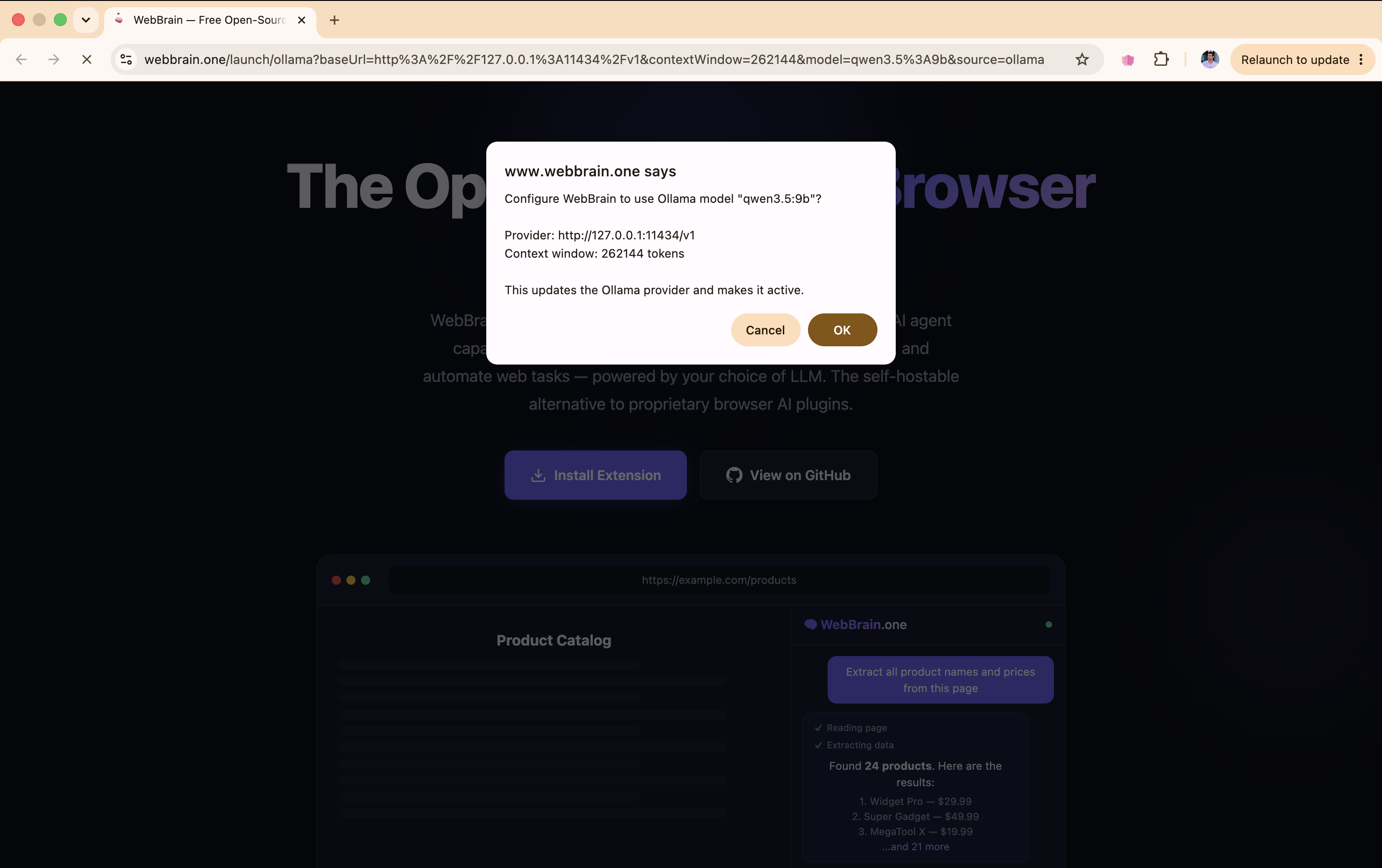
  https://webbrain.one/launch/ollama?baseUrl=http%3A%2F%2F127.0.0.1%3A11434%2Fv1&contextWindow=262144&model=qwen3.5%3A9b&source=ollama

Confirm the WebBrain prompt in your browser to use qwen3.5:9b via Ollama.
What it looks like
The launch URL opens WebBrain and asks whether to configure the extension for the selected Ollama model.
After confirmation, WebBrain shows a success message on the page.

Open the WebBrain panel and the active provider is now Ollama (Local).

And then the model responds from your local Ollama server.

Why this matters
Local browser agents should feel local all the way down. If you already have Ollama models installed, WebBrain should not make you copy provider URLs or manually match model names. The handoff makes Ollama the place where you choose the model and WebBrain the place where you use it in the browser.
This is also a better open-source loop: Ollama serves the model, WebBrain controls the browser, and the user keeps both pieces inspectable and self-hostable.
The current implementation lives on the codex/ollama-webbrain-launch-handoff branch. We hope it can make its way into Ollama proper so WebBrain setup becomes a normal ollama launch webbrain --model ... path for everyone.