From 16K to 50K Browser Screenshots: Fine-Tuning LFM2.5-VL-450M
The first benchmark result was bad enough to be useful. Off-the-shelf LFM2.5-VL-450M could recover fragments of browser state, but it almost never satisfied WebBrain's exact six-section screenshot contract. We kept the model small and changed the data instead. A first training round built around a 20K target produced 16,646 accepted examples. A second round expanded the corpus to exactly 50,000 screenshots and targeted the remaining failures. The deployed result now passes 44 of the same 100 held-out cases—and runs inside the browser through WebGPU.
Why start with LFM2.5-VL-450M?
The obvious way to improve vision quality is to use a larger model. For WebBrain's local fallback, that answer is incomplete. The model has to download into an extension, fit alongside the main browser workload, keep screenshots on-device, and run on consumer WebGPU implementations.
Liquid AI's LFM2.5-VL-450M gave us a useful starting shape: a genuinely small multimodal checkpoint, an architecture that could be exported for browser inference, and a model family designed to be adapted. The raw checkpoint was not already good at our particular response contract. That was the experiment.
The target was deliberately narrow. Given a 1280×720 browser viewport, produce six sections for a browser-automation agent:
- page purpose and current task;
- exact visible text;
- actionable controls and inputs;
- state, selection, loading, or validation signals;
- blockers such as modals, consent layers, and security challenges;
- unknowns, unreadable text, and uncertainty.
The goal was not to teach a 450M model all of computer vision. It was to make it much better at this one production call.
The unchanged evaluation gate
We froze a 100-case suite before selecting the final checkpoint. It spans authentication screens, search results, checkout, validation, modals, toast messages, loading states, consent banners, dashboards, charts, tables, email, kanban, calendars, maps, photos, multilingual OCR, occlusion, security challenges, and uncertainty calibration.
The suite is public on GitHub. Training and validation images were checked for exact and perceptual overlap with those 100 cases. The benchmark was run only after checkpoint selection; it was not used as a training loss or early-stopping oracle.
That separation matters. Without it, “44/100” could simply mean that the model memorized our release test.
Round one: a 20K target, 16,646 accepted examples
The first corpus was planned as an approximately 20K browser-GUI dataset. Licensing checks, deduplication, structural validation, and label review left 16,646 accepted rows:
| Source | Accepted rows | Role |
|---|---|---|
| HuggingFaceM4/WebSight | 9,561 | Broad webpage layouts and text |
| Farama Foundation MiniWoB++ | 4,592 | Compact browser tasks and controls |
| docling-project/ScreenParse | 2,493 | Screen parsing and GUI structure |
| Total | 16,646 | First frozen training corpus |
Each screenshot was paired with WebBrain's production system prompt and a six-section teacher response. The response mattered as much as the image: a model can recognize a login screen yet still fail WebBrain if it invents labels, omits blockers, or ignores the required sections.
This first LoRA fine-tune moved the release-lineage result from 0/100 strict passes and 4.17% mean rubric to 30/100 and 70.06% under the same PyTorch/Transformers evaluation path. That was not production-ready, but it proved that the small base had substantial task-specific capacity.
Round two: keep the useful rows, target the failures
The 50K corpus did not throw away round one. It retained the 16,646 reviewed examples and added 33,354 targeted browser-GUI screenshots, producing exactly 50,000 unique rows:
| Component | Rows |
|---|---|
| Reviewed round-one corpus | 16,646 |
| Targeted browser-GUI synthetic corpus | 33,354 |
| Total | 50,000 |
“Synthetic” here does not mean an image generator painted approximate websites. We generated controlled HTML/CSS browser interfaces and rendered them as screenshots in a real browser. That gave us exact knowledge of the labels, states, blockers, disabled controls, overlays, contrast, and multilingual strings present in each scene.
The targeted mix concentrated on the failure modes exposed by round one: 8,000 multilingual OCR examples, 4,500 forms, 3,500 modal and consent states, 3,500 tables, 2,500 authentication scenes, 2,500 loading states, 2,500 dashboards, 2,500 calendars, 1,500 occlusion and contrast examples, plus general browser observations.
Teacher labels were generated primarily by qwen/qwen3.6-35b-a3b, with 366 accepted labels from a local Q4 variant. Structural and grounding filters rejected malformed outputs, but teacher labels can still contain OCR mistakes or hallucinations; the dataset card says so explicitly.
The final split contains 46,879 training rows and 3,121 validation rows, grouped by task/site and deduplicated by image identity.
The 50K dataset is published on Hugging Face, with row-level provenance, split metadata, teacher identifiers, and leakage checks documented in its dataset card.
Training less than one percent of the model
Round two used supervised LoRA fine-tuning on one RTX 4090 with 24 GB VRAM:
| Setting | Value |
|---|---|
| Base checkpoint | LiquidAI/LFM2.5-VL-450M |
| Total parameters | 452,847,616 |
| Trainable LoRA parameters | 4,128,768, about 0.91% |
| LoRA configuration | rank 16, alpha 32, dropout 0.05 |
| Effective batch size | 16 |
| Precision | BF16 |
| Training length | one epoch, 2,929 steps |
| Peak VRAM | 23,272 MiB |
Validation loss continued improving to the end. The deterministic post-training evaluator measured 0.326301 at step 2,500 and 0.324976 at step 2,929, so we selected the final checkpoint rather than stopping early.
Only the adapter is small. Once merged, the released model remains the same 453M parameter class as its base; adding more training examples changes the weights, not the number of parameters.
What changed across the two rounds
The cleanest lineage comparison uses the same PyTorch/Transformers evaluator:
| Checkpoint | Training examples | Strict passes | Mean rubric | Errors |
|---|---|---|---|---|
| Off-the-shelf LFM2.5-VL-450M | 0 | 0/100 | 4.17% | 0 |
| WebBrain V1 | 16,646 | 30/100 | 70.06% | 0 |
| WebBrain V2 | 50,000 | 36/100 | 74.99% | 0 |
The first data round produced the dramatic gain. The second produced a smaller but still real improvement on the same held-out suite: six additional full passes and 4.93 mean-rubric points. That is a familiar fine-tuning curve. Once a small model learns the broad task and output grammar, more data mostly improves difficult edge cases rather than recreating the first leap.
The earlier tiny-model benchmark reported the raw 450M checkpoint at 1/100 and 21.6% through MLX. That is a different inference and decoding stack from the release-lineage PyTorch row above, so we do not subtract one number from the other. Both measurements tell the same practical story: the unfine-tuned model was far below the browser-specific checkpoints.
The deployed WebGPU result
Training success is not enough if the browser export collapses. We merged the adapter, exported the model to ONNX, kept the embeddings and vision encoder in FP16 to preserve small-text and GUI detail, and quantized the merged decoder to symmetric Q4.
The deployed package passed a real Transformers.js/WebGPU smoke test and produced this release-gate result:
| Deployment | Strict passes | Mean rubric | Six-section completion | Errors |
|---|---|---|---|---|
| WebBrain V2, PyTorch | 36/100 | 74.99% | — | 0 |
| WebBrain V2, ONNX Q4/FP16 | 44/100 | 76.24% | 87/100 | 0 |
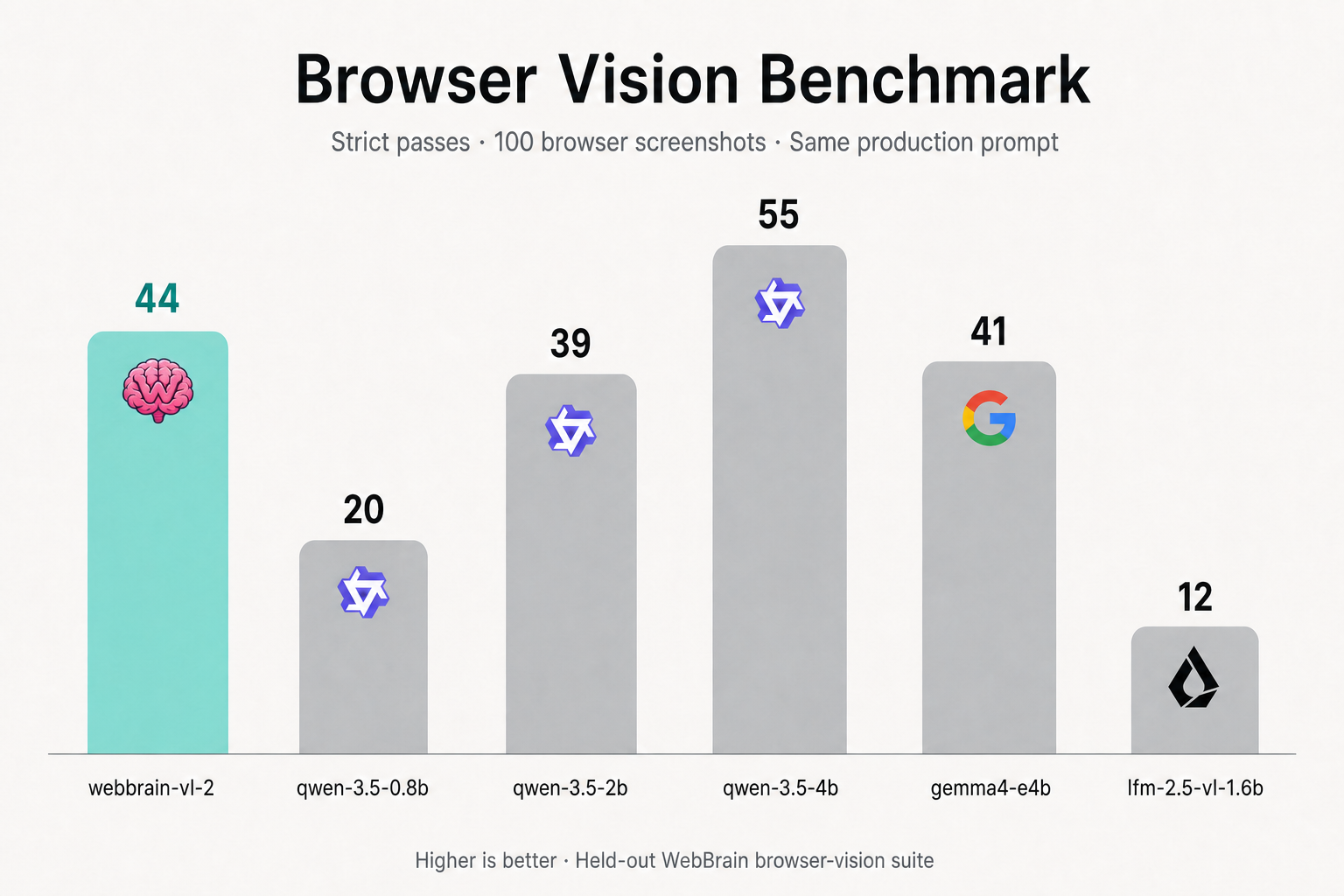
The deployed WebGPU row is shown against the same compact-model benchmark results used in our expanded comparison.
Quantization does not normally promise higher quality. Autoregressive generation can shift with numerical format, runtime kernels, and decoding behavior, and in this suite those shifts happened to cross more strict thresholds. We publish both rows rather than pretending one runtime is a universal property of the checkpoint.
The merged model and WebGPU-ready ONNX package are both available on Hugging Face.
A 450M specialist versus much larger models
The fine-tuned 450M model did something the raw size would not predict. Its deployed 44/100 result sits in the same strict-pass band as Qwen 3.5 2B at 39/100 and Gemma 4 E4B at 41/100. Qwen and Gemma retain higher mean rubric scores, so the right claim is task-specific parity, not universal superiority.
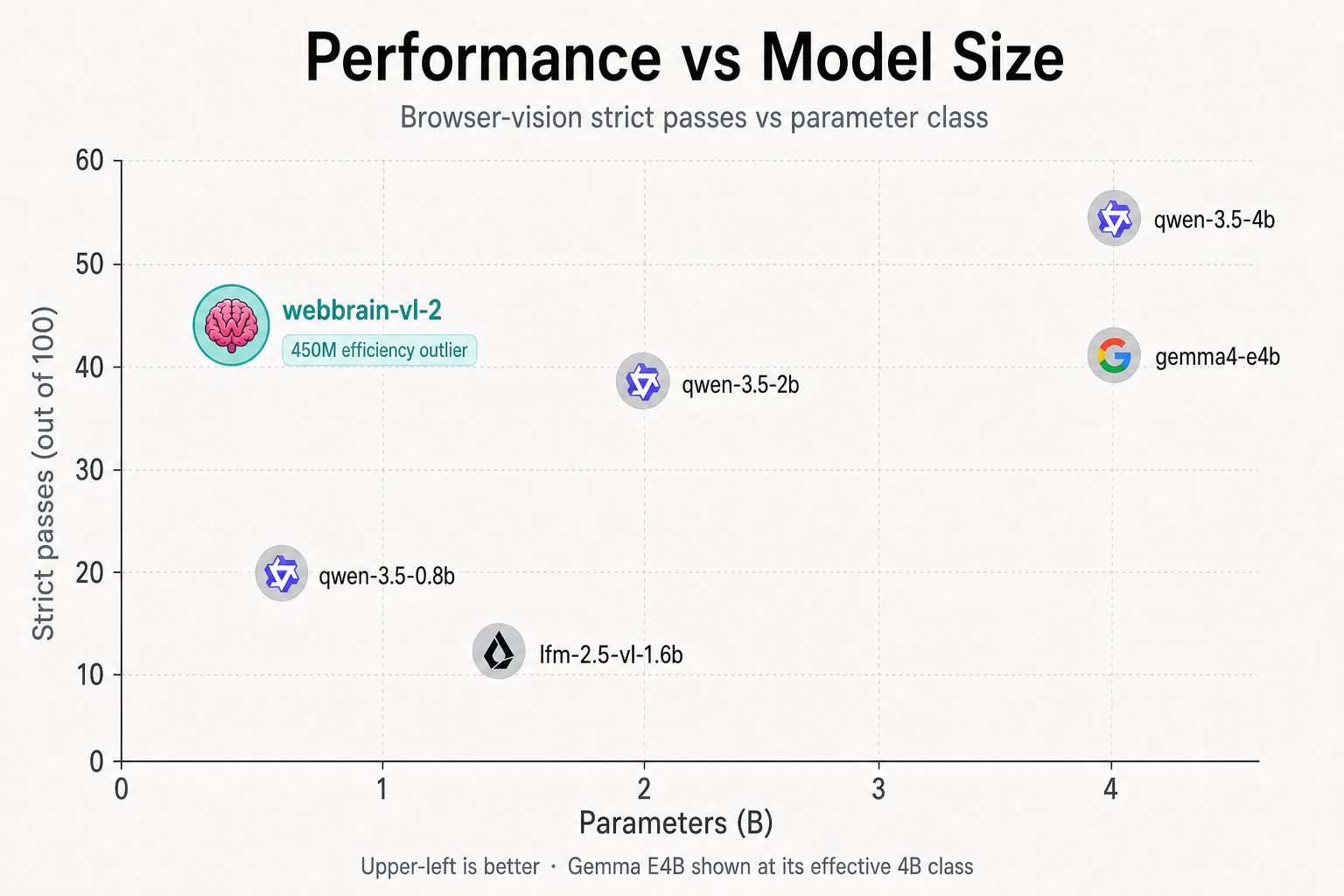
With parameters on X and strict passes on Y, the browser-specific 450M model sits apart in the upper-left. Gemma E4B is shown at its effective 4B class.
The result against LFM2.5-VL-3B is more dramatic. The 3B MLX run scored 0/100 strict passes and a 7.76% mean because it repeatedly ignored the required numbered six-section contract. WebBrain V2 followed that contract far more reliably and scored 44/100 despite having roughly one-seventh as many parameters.
That does not prove that 450M is a generally stronger vision model than LFM 3B. It proves something more useful for product engineering: under WebBrain's exact browser-observation prompt and grader, the smaller specialist is much more effective than the larger off-the-shelf checkpoint.
Kudos to Liquid AI. A fine-tune can only expose capacity and adaptability that exist in the foundation. LFM2.5-VL-450M gave us enough of both to build a useful browser specialist without turning the extension into a multi-gigabyte inference appliance.
A much less expensive WebBrain stack
WebBrain can split planning and vision instead of paying a multimodal API for every turn:
- Run the main text-and-tool loop through an inexpensive hosted planner such as Poolside Laguna S 2.1 on OpenRouter.
- Route the minority of calls that actually need pixels to WebBrain VL 2 450M locally through WebGPU.
- Keep corroborating high-impact observations with DOM, accessibility, and browser-native state.
The economics are attractive. Our saved 100-case Laguna S high-reasoning planner replay reported $0.0227, while a separate GPT-5.6 Luna Pro 100-case planner replay reported $0.228—about ten times as much. Those runs used different benchmark revisions and should not be treated as a controlled billing comparison, but they show the scale of the available budget tier. OpenRouter prices and cache behavior can also change.
The local vision side adds no remote image-token bill after the model download. That makes it plausible to run WebBrain with an inexpensive text-only API and private local screenshot fallback at roughly an order-of-magnitude lower observed planner cost than an already economical hosted route such as Luna, without giving up visual recovery entirely.
If you can run a strong local multimodal model or prefer a frontier vision API, those remain excellent options. The point is that they are no longer the only coherent way to give a browser agent eyes.
What the experiment taught us
More parameters are a powerful general-purpose prior. Better data is a powerful product-specific prior.
The off-the-shelf 450M model was not good enough for WebBrain's screenshot contract. The first 16,646 accepted examples taught it the task. The 50K corpus broadened difficult browser states and improved the held-out result again. ONNX export preserved—and in this release run slightly improved—the behavior in the runtime users will actually execute.
That is the power of fine-tuning: not making 450M universally equal to 4B, but making 450M unusually good at the precise job your system needs.
Tags: #WebBrain #LFM25VL #LiquidAI #FineTuning #LoRA #WebGPU #ONNX #BrowserVision #LocalAI #TeacherDistillation